
BioT Notification Plugins
A BioT notification plugin is invoked when a predefined event occurs in BioT. Notification plugins can subscribe to events across a range of entity types, including devices, patients, caregivers, organizations, organization users, and generic entities. For example, a plugin can be triggered when a device is created, when a patient's measurement is saved, or when a caregiver logs in. For the full list of available entity types and actions, see the Notifications table below.
High Level Flow
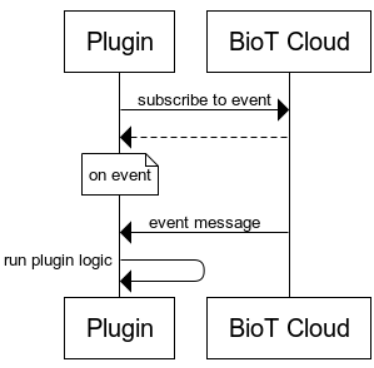
Notification plugins are fire-and-forgetBioT triggers the plugin when the event occurs, but does not wait for or monitor the plugin's response.
Subscribing to Events
To subscribe a BioT plugin to notification events, configure the notifications array as part of the plugin creation or update. Alternatively, you can manage plugin subscriptions directly via the BioT Console. For full details on both options, see Custom Plugin Deployment and Plugin Configurations Management pages.
The following notifications are available to subscribe to:
| Entity | Description | Available Actions |
|---|---|---|
| caregiver | Any user based on the caregiver template |
|
| command | Device command related actions |
|
| device | Any device in the system |
|
| device-alert | Device alert related actions |
|
| generic-entity | Any entity based on the generic entity template |
|
| organization | Any organization in the system |
|
| organization-user | Any user based on the organization-user template |
|
| patient | Any user based on the patient template |
|
| patient-alert | Patient alert related actions |
|
| Registration Code: | Self user registration code |
|
| usage-session | Regular or remote usage sessions |
|
Updated 4 months ago